
Artist FAQs
PRE-REGISTRATION
There are a number of things you’ll need before you can finalise your registration. Please make sure you have all of the following information to hand before you begin:
- Eventotron account
- See Tickets client account information (all GICF ticketing is managed via See Tickets. If you don’t already have a See Tickets client account, you can find info on how to create one here)
- Show title
- (include your name if appropriate, i.e. John Doe: Doe Laughing Matter)
- Show date & time
- Venue (venue browser and applications available via Eventotron Venue Browser)
- Main genre
- Names & email addresses of the performers
- Ticket prices (including any concessions)
- Show duration (including any intervals)
- Images (high quality with no visible text, in sizes 1600×900 px and 1080×1350 px)
- Show copy (description of the show to be included in the brochure and/or online listing. Brochure copy: 20 words max, website copy: 150 words max.) See our Promo Guide for guidance)
- Age suitability (must be in line with your venue’s policy)
- Content warnings (i.e. swearing, strobe lighting, loud noises, audience interaction, etc)
You can then explore all venues in the Venue Browser section in Eventotron. Venue details will also be listed on the GICF website and on our Venue Finder tool.
From the Venue Browser, you’ll be able to contact venues directly to ‘Express Interest’ and request a slot for your show. Replies will go directly to your Eventotron Inbox. We encourage you to keep this monitored and to reply as efficiently as possible.
Once a venue has accepted your expression of interest, your show will link to the venue.
You’ll then be able to complete your Registration, and click ‘Submit’.
If you want to reach out to venues outside of Eventotron, take a look at our Venue Outreach Template here.
When choosing a venue, consider the following:
- Capacity – is it the right size for your audience?
- Location – is it conveniently situated for attendees?
- Room type – does the space suit your show format?
- Availability – can they offer your preferred dates and times?
- Technical set-up – can they support your tech requirements?
- Costs – what is the hire fee, and what’s included (marketing, tech
- support, door staff, etc)?
- Scheduling – are there other events nearby that could affect
- your show (e.g. noise bleed)?
- Experience – do they host comedy nights outside the festival?
- Reputation – is the venue well regarded by other performers?
Once you have confirmed a venue, you’ll be able to register your show on Eventotron and pay your registration fee.
The majority of venues will be able to support basic to mid-level technical needs, however this varies by space. Most will provide standard comedy setups such as microphones, a PA system, and basic lighting. Some may also offer additional equipment depending on their facilities. As technical provision differs between venues, you should confirm the technical capabilities of any potential venue in advance. This will determine what is provided in-house and should help clarify the venue’s suitability for your show.
The level of technical support varies from venue to venue, and ranges from basic access to the space through to a dedicated technician depending on the set-up and scale of the room. We recommend checking specific details with any potential venue before confirming a slot, and speaking directly with them to confirm what will be included, what’s expected from you, and whether any additional staffing or technical requirements need to be arranged.
REGISTRATION
Login to Eventotron and browse venues. Once you’ve confirmed a venue for your show, and you have all your registration information ready, you’ll be able to register your show on Eventotron. For full info, please see our Show Registration Guide here.
Your registration fee covers up to three performances of the same show at the same capacity.
Your registration fee also includes your festival listing on our website (225,000+ annual visits) and, where applicable, included in our printed brochure, with rates based on venue capacity. 70,000 brochures will be launched on the 7th January 2027, with over half delivered directly to homes across Glasgow.
Act Registration (Web & Brochure) Opens: Wednesday 16th September 2026
Act Registration (Web & Brochure) Closes: Friday 20th November 2026
Web Only Registration Opens: Wednesday 9th December 2026
Web Only Registration Closes: Friday 8th January 2027
A good show listing uses clear, punchy copy that quickly communicates what the show is about and what sets it apart. Include an engaging hook or premise, a brief description of the format (stand-up, character, improv, etc.), and the core idea behind the show. If you can capture the tone of the show in the description, even better – a distinctive voice can help convey its personality and atmosphere.
The image is just as important as the copy (perhaps even more so). It should be high quality, eye-catching, and reflective of the show’s overall tone. Ideally, it should feature the performer clearly, rather than being overly busy or abstract, and work effectively as a thumbnail among a grid of listings.
Ultimately, the strongest listings combine clear, confident copy with a bold, recognisable image that gives people a reason to stop scrolling and take notice.
During registration, you will be asked to provide your show image in two formats: one for your website listing and one for social media promotion. The images should meet the following specifications:
- 1600 × 900 pixels (16:9 horizontal aspect ratio)
- 1080 × 1350 pixels (4:5 vertical aspect ratio)
You can edit your show copy and update your image at any point during registration, up until you finalise and pay the registration fee. Once payment has been made, your registration will be locked and any further changes can only be made by the GICF team.
If you need to make changes to your listing after this point, please contact us at info@glasgowcomedyfestival.com.
Your show will go on sale within 10 days of payment of your registration fee. The GICF team will email you to confirm once your listing is live.
TICKETING
All GICF show ticketing is managed via SeeTickets. In order to register your show, you’ll need a SeeTickets client account, which is where you’ll be able to sell tickets, issue comps and monitor your sales. Please be aware that a SeeTickets client account differs from a SeeTickets customer account.
You can log in to an existing SeeTickets client account, or create a new one here: https://clientconsole.seetickets.com/
Please note: You do not need to create a show listing on See Tickets. You only need to create an account. The GICF team will create your listing, link it to your account, and confirm with you directly when your show is live.
If you wish to allocate complimentary tickets, the simplest way is to set up a Guest List via your Client Console.
Simply create your Guest List (as pictured), then select Add Guest. From there you can add attendee details, send a confirmation, etc.
Please note: We do not process press tickets for you – if you’re inviting press, you’ll need to generate and send those comps yourself.
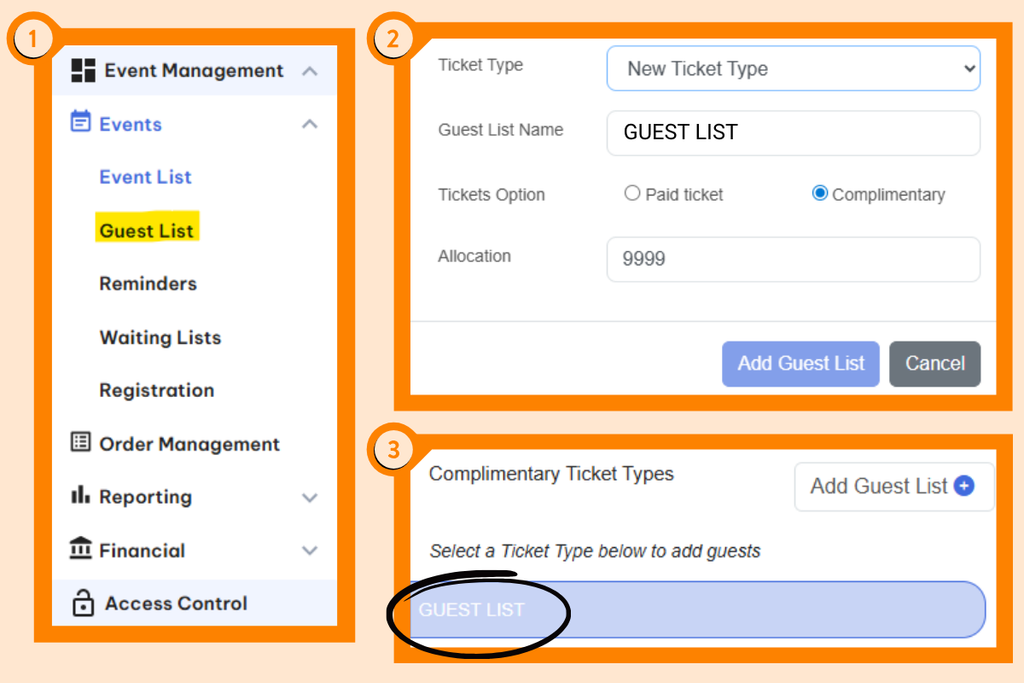
If you need to make any changes to your Guest List (e.g. cancel comp tickets), you can do so via the Order Management section of your See Tickets account by searching the attendee’s Order ID or email address.
Once your show is on sale, you will receive automated sales reports via email from See Tickets. Additional reporting and event management tools are also available through your See Tickets account. Detailed sales reports can be accessed in the Reporting section. To view customer data, navigate to Events > Event List, click the three dots beside your event, and select Customer Data.
There is no one-size-fits-all answer, but for most UK comedy festivals, ticket prices typically range from £5–£15, depending on the act’s profile and demand. When setting your price, consider your audience reach, previous ticket sales, and what similar acts are charging. If you’re debuting a new show, a lower price can help attract audiences and build momentum. Most importantly, make sure your pricing takes into account venue costs, box office splits, and any other expenses.
Please ensure you’ve completed your company details on SeeTickets so they can register you on their payment system. You can do this by selecting Company Details in the top right-hand section of the Client Console.
Once your event has passed, you’ll need to email your invoice to promoter.invoices@seetickets.com, and they will process payment for you.
Please make sure your invoice includes:
- Invoice number
- Show name
- Performance date
- Settlement amount
- Bank account details
Payments are generally received within 3-10 working days, depending on when payment is requested.
MARKETING & PROMOTION
With several hundred shows taking place each year, GICF focuses on promoting the programme as a whole while helping to give visibility to as many individual acts as possible.
Headline shows typically receive additional promotional support to help us reach wider audiences. Across all programming, our priority is to build awareness of the festival and encourage audiences to explore the full range of shows via our website and social channels.
Individual show marketing and promotion remains the responsibility of the performer. However, where capacity allows, we aim to feature a broad and diverse selection of acts across our communications.
Our promotional activity includes:
Website & Brochure
All registered shows are listed on our website (225,000+ annual visits) and, where applicable, included in our printed brochure (70,000 copies distributed).
Festival Marketing
Selected shows may be included in our email newsletters, social media posts, and website content.
Featured Show of the Day
A daily spotlight on our social channels designed to highlight a range of shows, including smaller and emerging acts.
Show Graphics
We provide GICF-branded graphics for all registered acts to support their own marketing and promotion.
Two-for-One Day
Returning in February, this initiative helps boost visibility and encourage audience engagement across the programme.
While the festival provides platforms and opportunities to support promotion, each act is ultimately responsible for marketing their own show. We are always committed to doing what we can to spotlight the breadth of talent across the festival.
Strong promotion can make a big difference to your audience numbers, so we recommend starting early and staying active throughout the festival.
Focus on creating a strong event listing with a clear title, engaging blurb, and high-quality promo images. Social media is key – post regularly, share clips and reminders, and tag the festival, your venue, and other performers where relevant.
You can also boost visibility by submitting your show to free listings and local press, using posters if your budget allows, and considering targeted social media ads.
Taking part in open spots and mixed bills is another great way to reach new audiences and build word-of-mouth.
For more tips and resources, see our full Promo Guide
You can create posters and graphics using beginner-friendly tools such as Canva, which offers free access with a basic account.
The festival provides all registered acts with a branded social media graphic once their show goes on sale. If you prefer, you can also use our editable Canva templates here. A branded poster template is also available, which can be customised with your show details and imagery.
These resources are completely optional – you are free to create your own designs that best reflect your show and promotional style.
If you do create your own materials, we encourage you to use the festival’s official branding, including logos and other assets available in the GICF Brand Kit.
You can find official festival branding, including logos and other assets in the GICF Brand Kit.
In the lead-up to the festival, you will be contacted with the option to take part in our annual 2-for-1 promotion in February. Please ensure that all relevant contacts for your show (including performers, producers, and anyone else who needs to receive these communications) are listed in the Artist Passes section of your registration.
MUSIC/PRS
This depends on your venue. Some venues provide pre-show and interval music, which you may be able to use, while others will require you to supply your own. If you have specific or more complex technical requirements (such as in-show music or sound cues), we recommend checking with the venue in advance to confirm whether these can be accommodated, or if you will need to provide your own technician or operator.
Check with your venue or promoter. If using copyrighted music in your show, a PRS licence fee will usually apply. Some venues will deduct around 4% of the gross box office (depending on the tariff), but if your show qualifies, you may be eligible for a discount rate. To apply, you’ll need to complete and send this form to varietyapplications@pplprs.co.uk ahead of your show.
FILMING
Any filming or recording for commercial purposes must be agreed in advance with both the festival and the venue. If you have any questions about filming or recording your show, please contact info@glasgowcomedyfestival.com.
Any filming or recording for personal use must be agreed in advance with your venue to ensure it can be safely accommodated. Recording a show is not as simple as setting up a camera at the back of the room – venues need to consider factors such as fire escape access, audience safety, and whether filming could impact seated capacity or the audience experience. If you have any questions about filming or recording your show, please contact info@glasgowcomedyfestival.com.